 OrgGenius
Product
Everything it does, and how it shows its work.
95 tools, 13 actions, ten layered permission sets, one boundary. Every capability below is shipped and in use.
01Ask and cite
Every answer points at records you can open.
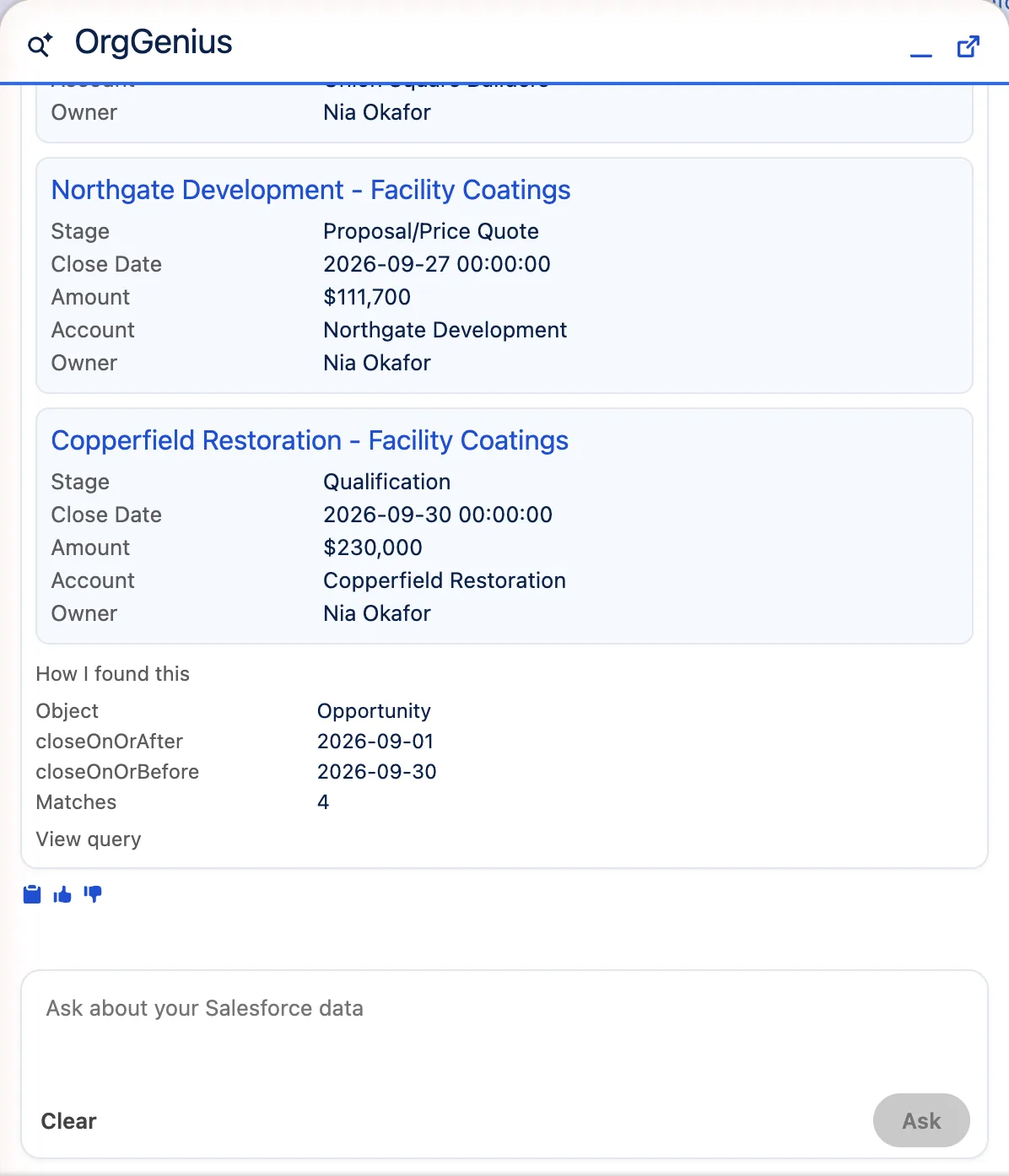
Ask in plain English. OrgGenius picks a tool, runs the query as you, and answers with the records it used as clickable chips. Every factual claim is traceable to a tool result, never to the model's own knowledge.
“How I found this” opens on any answer: the object, the filters the model chose, the match count, and the query itself. It is the difference between an answer and an assertion.
- Multi-turn conversation with state, and suggested follow-ups as buttons
- Totals and counts computed in Apex: the model reports the number, it never does the sum
- Risk signals reported as facts (no activity since the 14th), never as an invented score
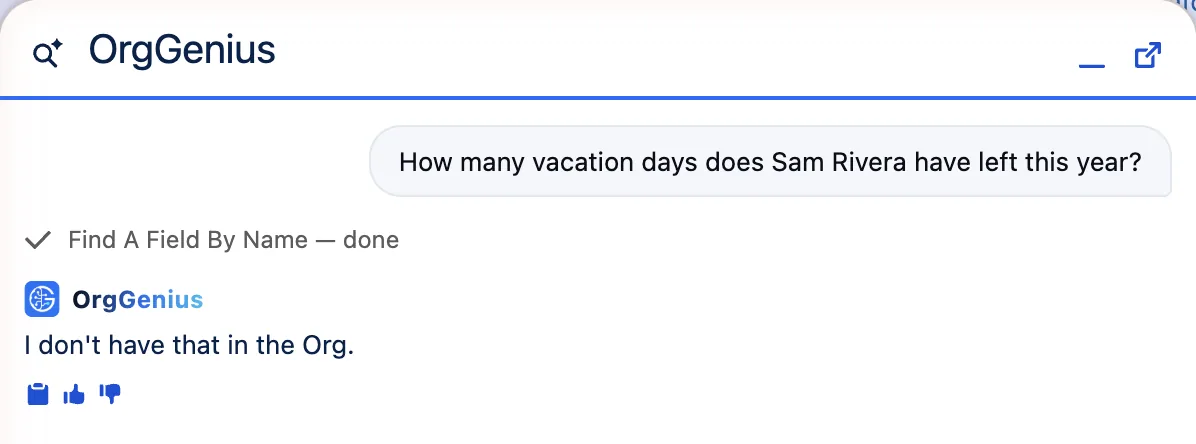
- On empty retrieval it says exactly: “I don't have that in the Org.”
02Actions
Thirteen things it can create. Nothing it can change or delete.
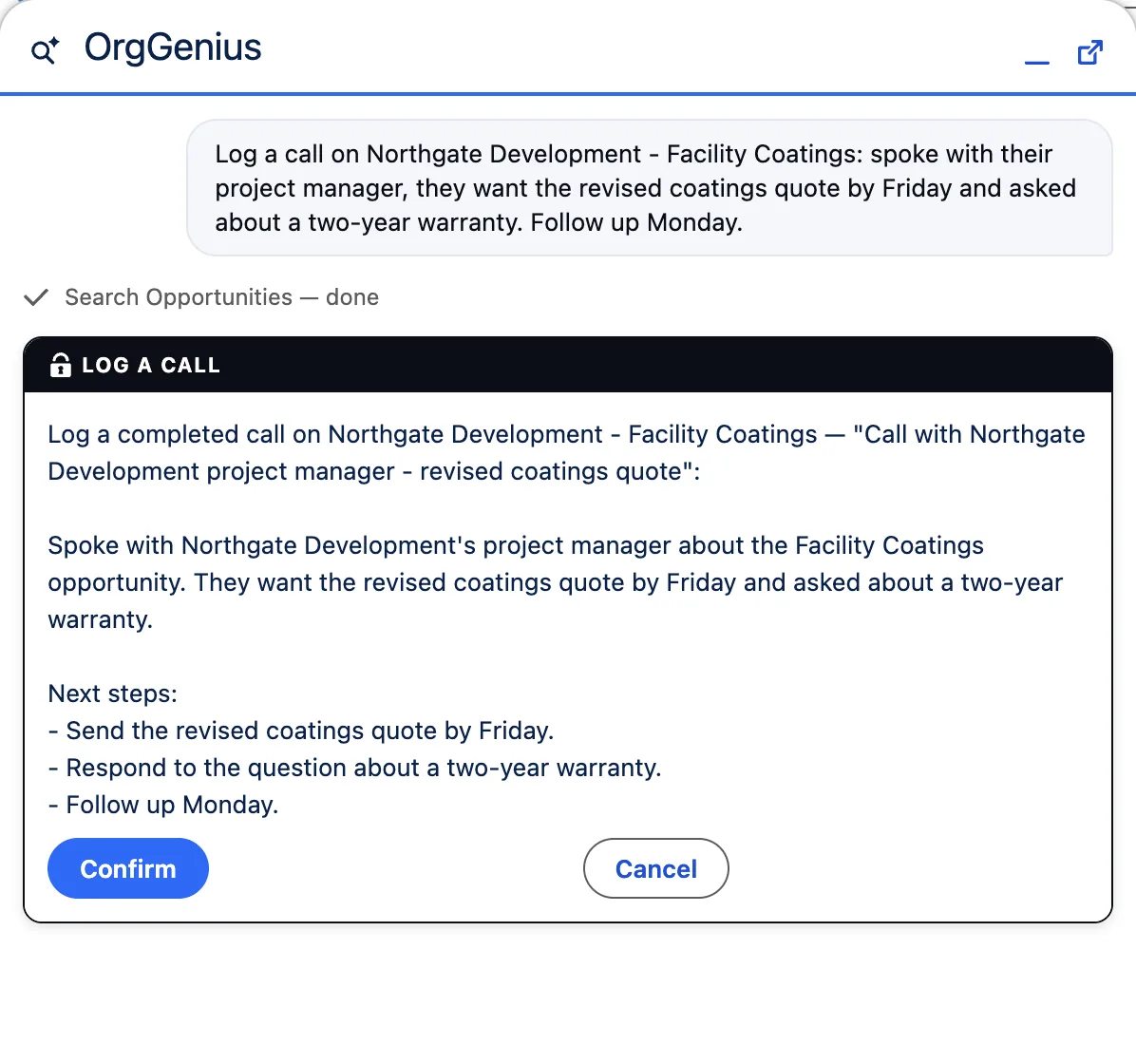
Every action takes a single record, is drafted in plain language, shown in full, and performed only after the person confirms. The draft is held server-side, so the browser cannot alter what was approved. Actions ship switched off.
Follow-ups
Create a follow-up task · Create a follow-up meeting · Log a call · Save as note
Records
Create account · Create contact · Create lead · Create opportunity · Create case
Communication
Reply to case · Email contact · Email lead · Post to Chatter
Customer email needs its own permission set. The address is read from the record, never chosen by the model.
Your own
An admin can register an Autolaunched Flow as an action. A single-record update Flow is allowed. A delete Flow is refused by every route.
Log a call, from a voice note
Dictate a rambling message on your phone; it comes back as a structured call log (subject, summary, next steps) for you to approve, and lands as a completed activity on the timeline.
The confirmation card is the contract: what you read is exactly what will be saved, held server-side so the browser cannot alter what was approved. Cancel writes nothing, except an audit entry that you were asked.
Pre-call prep, then the opportunity, then the email
The SDR logged a discovery call yesterday. The account executive picks it up this morning, from the account page, in three questions.
1 · Read
“Prep me for the call with this account.”
A brief built from the records: who they are, the open opportunities and cases, what the last logged call said, the emails on file if Knowledge is on. Every line cites the record it came from. Nothing is written.
2 · Create, once confirmed
“Open an opportunity for the renewal we discussed.”
The Create opportunity action drafts name, stage, close date and amount from what the call log says, and shows the card. The stage list is read from your org, not guessed. Confirm inserts one record; Cancel inserts nothing.
3 · Draft, then you send
“Draft the follow-up email to the contact.”
The Email contact action writes the email from the same records, to the address on the contact record, never one the model chose. You read it in full and confirm. It goes out under your name, from your org.
The same outcome an autonomous sales agent promises, with your hand on every write. Three confirmations, three audit entries, no plan running while you are not looking.
03Knowledge
Inside emails, files, Chatter and articles.
The base product answers from fields: amounts, stages, dates. Knowledge answers from words: what an email said, what a PDF contains, what somebody posted. “What did we tell Acme about delivery?” “Find the spec sheet for the renewal.”
There is no index to build and nothing to sync. It searches the full-text index Salesforce already maintains for every org. Assigning one permission set is the entire setup. Files means file content: PDFs, Word documents, spreadsheets and notes match on what they say.
Honest limit: it is keyword search. “Emails mentioning cancellation” works; “emails where the customer sounded unhappy” does not, and OrgGenius is told to say the words were not found, not that the topic was never discussed.
Search emails
Subject and body of email messages you can open
Search files
Full text of PDFs, documents, spreadsheets and notes: SharePoint, Drive and OneDrive too, via Files Connect
Search Chatter
Posts and comments across the feeds you can see
Search Knowledge
Published articles, in orgs with Lightning Knowledge. Withdrawn, not failed, where it isn't enabled
Attached files
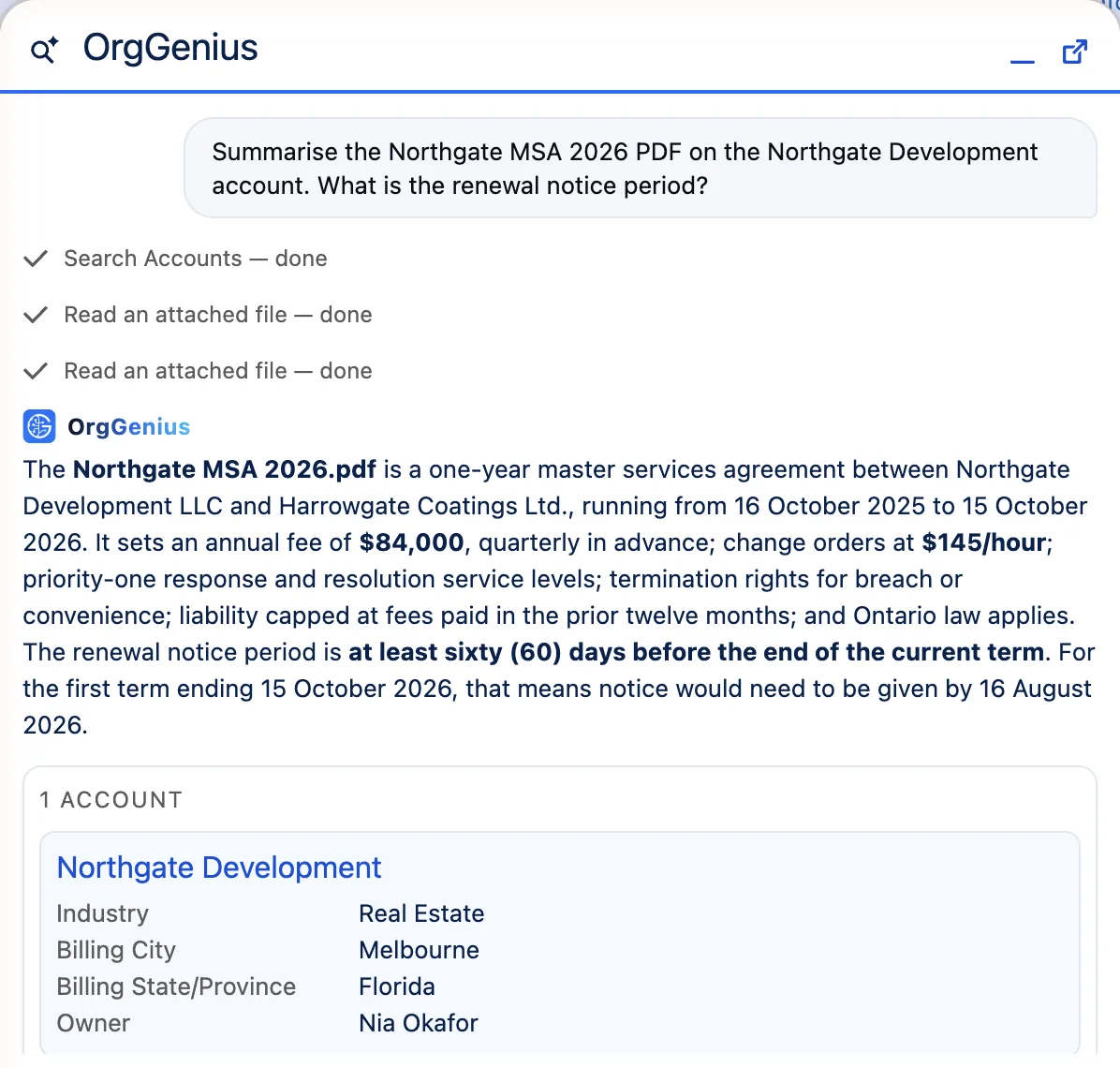
“Summarise the contract on this opportunity.” It reads the actual PDF, image or text file, with your own file access checked on every turn. Masking covers text files; it cannot reach inside a PDF, and we'd rather say so than let you assume it does.
External objects
If your org surfaces an external system (SAP, a warehouse, anything over OData) as Salesforce external objects, OrgGenius queries it like any other object. Same permissions, same citations, zero extra configuration. Verified live.
Agents
An admin bundles tools and instructions into a named agent (a “Renewals desk” with its own tools and tone) in a four-step wizard. Users pick the agent; the boundary is unchanged.
04The catalogue
95 tools, grouped by what people ask.
Every tool is a read: SELECT or FIND, whitelisted operators, describe-checked names, bind variables only. An admin can switch any of them off, and build new ones in the wizard.
Accounts
Account 360 · My accounts · Accounts near a location · Big deals going quiet · Accounts with open work and open cases · Search by name or industry
Opportunities
My pipeline by stage and total · Closing by date · At risk · Pipeline by industry · Meeting prep · Opportunities for an account · Products by name or code
Cases
My open cases · Open cases for an account · By status · Recurring subjects · Cases like this one · Resolution context · Case by number
Contacts and leads
Contacts at accounts with deals closing · Lead counts by status · My open leads · Search by name or company
Approvals
My pending approvals · Oldest pending · By object · Approvals I submitted · Approval history for a record
Users and access
Who can access what · Permission sets for a user · Profiles granting object access · Users not logging in · Login history · Lockout state · Recent setup changes
Schema
Objects in the org · Fields on an object · Find a field by name · Picklist values · Record types
Knowledge
Search emails · Search files · Search Chatter · Search Knowledge · Read attached file
Yours
Anything your admin builds, on standard objects or the custom ones nobody outside your company has heard of.
05Where it runs
Where your people already are.
Utility bar
Open on every page of the app your team lives in. Ask without leaving the record.
Record page
On any Lightning record page, aware of the record you are looking at.
Mobile
The Salesforce mobile app, with dictation. The phone keyboard's microphone works because the composer is a real text field: nothing to install, nothing to learn.
06What it deliberately refuses
Three things it will not do, on purpose.
Web research
Answers come only from the org. That sentence closes security reviews.
Customer-facing autonomy
An agent that talks to customers unsupervised is the largest liability surface in this category. Every write here is drafted, shown, and confirmed by a person.
Bulk and autonomous writes
An action takes one record id, never a filter or a list. “Update all my opportunities” has no expressible form. It is not a gated request, it cannot be phrased.